1
/
of
7
LESONG 二合一鍵帽按壓旋轉指尖陀螺 2-in-1 Clicker Spinner Fidget (Pack of 2)
LESONG 二合一鍵帽按壓旋轉指尖陀螺 2-in-1 Clicker Spinner Fidget (Pack of 2)
SKU:
Regular price
HK$228.00
Regular price
Sale price
HK$228.00
Quantity
Couldn't load pickup availability
🎯 適合對象
- 適合年齡:8 歲以上至成人(含軸承及細小鍵帽,幼童使用需成人陪同)
- 適合對象:專注力不足/過度活躍(ADHD)、自閉症譜系(ASD)、焦慮或壓力高、有咬手指甲/捽皮膚/㩒原子筆/敲枱等無意識習慣的青少年及成人、需要在上堂或開會時保持專注的人士
- 適用場地:課室、自修室、辦公室、會議、車程及等候時間、家居
📦 產品描述
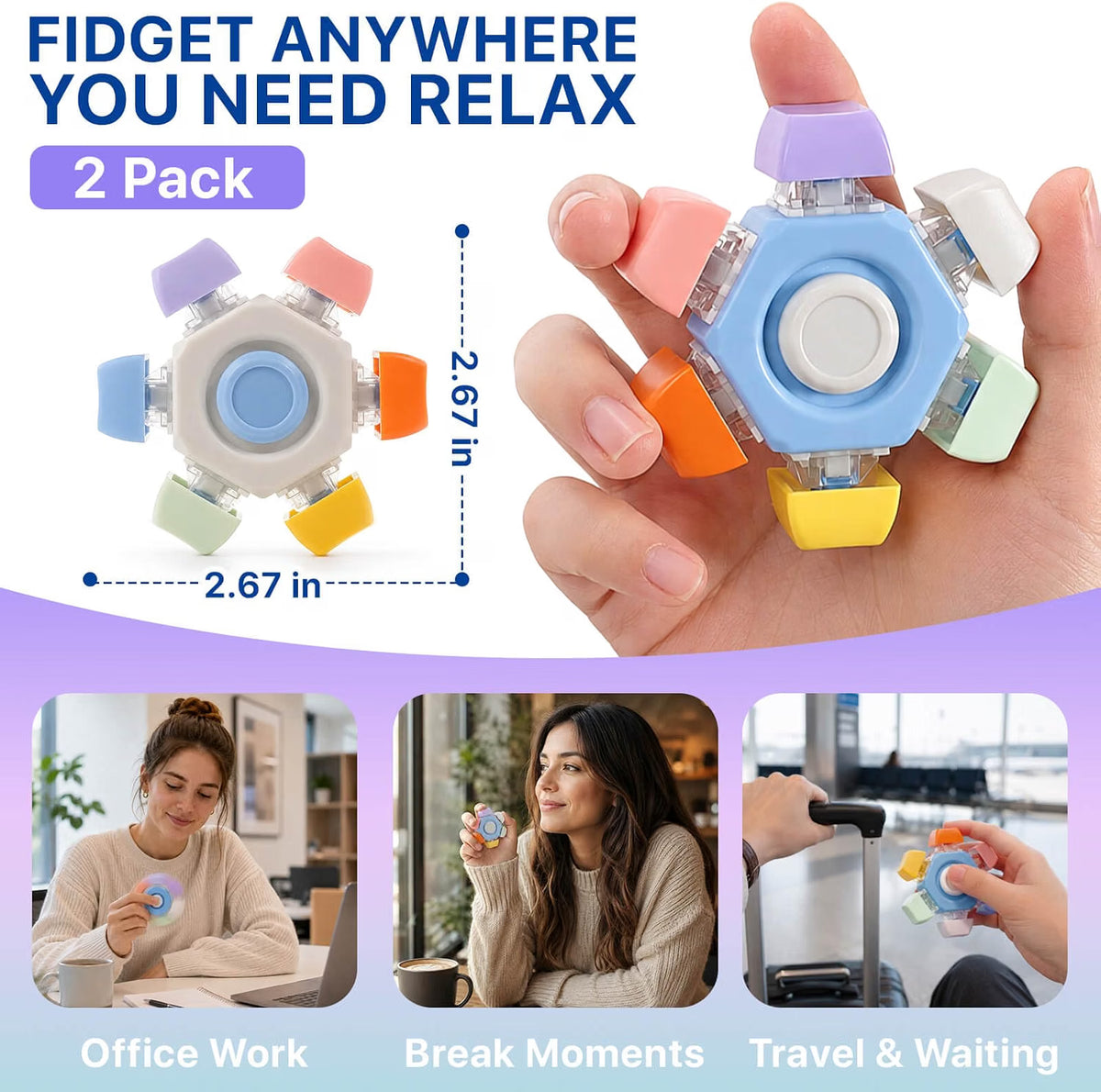
- 兩種玩法一件齊:握住中心轉動外圈,可持續旋轉 30 秒以上;或按壓彩色鍵帽,發出清脆按鍵聲及扎實的觸感回饋。
- 旋轉時彩色鍵帽會融合成漸變效果,視覺上極為吸引,本身就是一種視覺安撫刺激。
- 安靜或有聲,自己揀——採用優質軸承,旋轉順滑低噪,適合辦公室、會議、課室使用;想要更強回饋時則按壓鍵帽,清脆按鍵聲相當解壓。
- 每件 6.8 × 6.8 cm(2.67 吋),掌心大小,單手即可操作,輕巧易放入褲袋、書包或旅行袋。
- 一套 2 件,可以一件放書枱、一件放書包,或與朋友分享。
✨ 產品好處
- 同時提供視覺、觸覺、聽覺三種回饋,適合感覺尋求強、單一刺激好快滿足唔到的使用者,比只得一種功能的指尖陀螺耐玩得多。
- 給手部一個無害出口,取代咬手指甲、捽皮膚、㩒原子筆、敲枱等無意識習慣——這種「行為替代」比單純制止有效得多,亦減少因被叫停而生出的對抗情緒。
- 低調的科技產品外形對高小至中學生特別重要——「唔想被人當成細路」往往係青少年拒絕使用感統工具的主因,呢款佢哋願意真正帶去學校用。
- 安靜功能與有聲功能分開,讓使用者學識按場合自我調節:課室用旋轉、放學後用按壓,本身就是自我管理練習。
🎮 遊戲方法
- 專注輔助:上課、溫書或開會時單手握住慢慢旋轉,一邊聽一邊郁手。與小朋友一齊訂立「放枱面、課室只用旋轉功能」的規則,讓佢自己管理。
- 視覺追蹤練習:轉動後專注望住漸變色的變化直至停止,配合深呼吸,是快速收攝注意力與平復情緒的簡單方法。
📐 產品規格
- 尺寸:每件 6.8 × 6.8 cm(2.67 × 2.67 吋)
- 單位:2 件/套
- 面料:ABS 膠機身配彩色鍵帽,內置優質軸承
- 顏色:彩色鍵帽(以現貨為準)
- 功能:旋轉(持續 30 秒以上,低噪)+ 按壓鍵帽(清脆聲響回饋)
- 用途:專注輔助、情緒安撫、感官回饋、替代無意識習慣、青少年及成人減壓、辦公桌擺設
- 保養:以濕布抹淨後抹乾,避免浸水(含軸承,入水會影響順滑度及生鏽)。
- 安全提示:含軸承及細小鍵帽,3 歲以下嚴禁使用(有窒息風險);勿拆開機身;如發現鍵帽鬆脫請立即停用。
🎯 Suitable For
- Age: 8 years to adult (contains bearings and small keycaps; supervision needed for younger children)
- Best for: ADHD, ASD, anxiety and stress, teens and adults with unconscious habits like nail biting, skin picking, pen clicking or desk tapping, and anyone who needs to stay focused through lessons or meetings
- Settings: classrooms, study rooms, offices, meetings, travel and waiting time, home
📦 Product Description
- Two ways to fidget in one: hold the centre and spin the outer ring for 30-plus seconds of smooth rotation, or press the keycaps for crisp clicks and firm tactile feedback.
- As it spins, the coloured keycaps blur into a gradient effect — visually absorbing in its own right.
- Quiet or audible, your choice: premium bearings keep rotation smooth and low-noise for offices, meetings and classrooms; press the keycaps when stronger feedback is wanted.
- At 6.8 × 6.8 cm (2.67 in), it's palm-sized for one-handed use and light enough for a pocket, backpack or travel bag.
- Two per pack — one for the desk, one for the bag, or share with a friend.
✨ Benefits
- Delivers visual, tactile and auditory feedback in one tool, suiting strong sensory seekers who exhaust single-action spinners quickly.
- Gives hands a harmless outlet in place of nail biting, skin picking, pen clicking and desk tapping — behaviour substitution rather than simply stopping the habit.
- The understated gadget look matters to older children and teens: "I don't want to look like a little kid" is the main reason sensory tools go unused, and this one actually gets carried to school.
- Separating quiet and noisy functions lets the user match the tool to the setting — spin in class, click after school — which is self-regulation practice in itself.
🎮 How to Play / Use
- Focus aid: hold it one-handed and spin slowly during lessons, study or meetings. Agree rules together ("stays on the desk, spinning only in class").
- Visual tracking: spin it and watch the colour gradient until it stops, breathing slowly — a simple way to gather scattered attention and settle.
📐 Product Specifications
- Size: 6.8 × 6.8 cm (2.67 × 2.67 in) each
- Unit: pack of 2
- Material: ABS body with coloured keycaps and premium internal bearings
- Colours: assorted keycaps (subject to stock)
- Functions: spin (30+ seconds, low noise) and press keycaps (crisp click feedback)
- Use: focus support, calming, sensory feedback, replacing unconscious habits, teen and adult stress relief, desk gadget
- Care: wipe with a damp cloth and dry; avoid soaking (bearings may seize or rust).
- Safety: contains bearings and small keycaps — strictly not for children under 3 (choking hazard); do not dismantle; stop using if a keycap loosens.
Share